
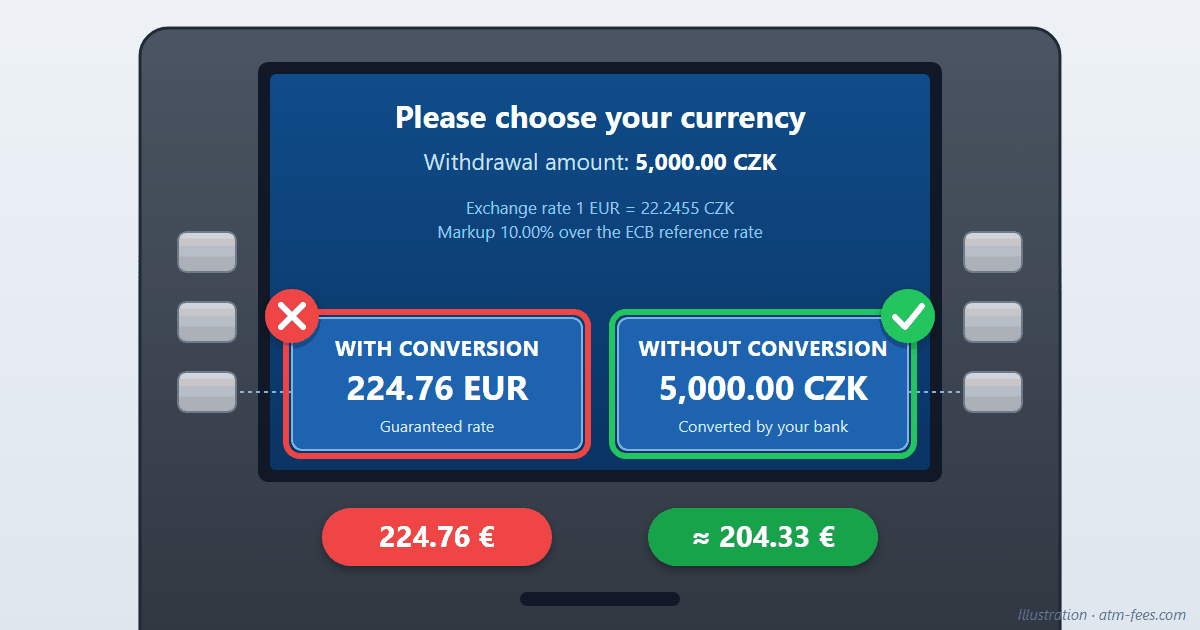
You're withdrawing koruna in Prague and the ATM asks you a question: "With conversion" or "Without conversion"? The first option shows an amount in your home currency, which feels reassuring. It's the wrong choice: in our example, it costs €20 more on a 5,000-koruna withdrawal. Here's how to read that screen, line by line.
The image above is a reconstruction: it uses the usual layout and wording of these screens, with amounts calculated at the ECB reference rate of 2 October 2026. Our example uses a euro card. With a card in another currency the choice works the same way, but the markup line described below is only mandatory for cards issued in the EU/EEA: with a US, UK or other card, it may not be shown.
What the screen is really telling you
- "Withdrawal amount: 5,000.00 CZK": the banknotes you'll receive. This doesn't change, whatever you choose.
- "Exchange rate 1 EUR = 22.2455 CZK": the rate the ATM wants to apply. That day, the ECB reference rate was 24.47 koruna per euro. At the ATM's rate, each euro buys you fewer koruna.
- "Markup 10.00% over the ECB reference rate": the margin, in black and white. Since April 2020, Regulation (EU) 2019/518 requires ATMs and card terminals in the European Union to display it before you confirm. It's the most important line on the screen… and often the least visible.
- "WITH CONVERSION — 224.76 EUR": this is DCC (Dynamic Currency Conversion). The ATM converts the amount itself, at its own rate, and charges your card that amount in euros.
- "WITHOUT CONVERSION — 5,000.00 CZK": your card is charged in koruna and your bank does the conversion, at the Visa or Mastercard network rate, very close to the ECB's.
The "Guaranteed rate" line under the first option is a sales pitch: what's really guaranteed is the margin.
The math: a €20 difference on a single withdrawal
| With conversion (DCC) | Without conversion | |
|---|---|---|
| Rate applied | €1 = 22.2455 CZK | ≈ €1 = 24.47 CZK |
| Charged for 5,000 CZK | €224.76 | ≈ €204.33 |
| Extra cost | + €20.43 | — |
The "without conversion" amount may vary by a few cents depending on the rate on the day the transaction is posted, and your bank may add its own foreign transaction fee (up to about 3% depending on the card). Even in the worst case, you're far from DCC's 10%. Over a week in Prague with three withdrawals, the gap already exceeds €60.
Our example uses a 10% margin. On independent operators' ATMs it's often between 7% and 13%; on card terminals it's often lower, but rarely negligible. Read the one displayed: that's the one that counts.
The same trap in restaurants and shops
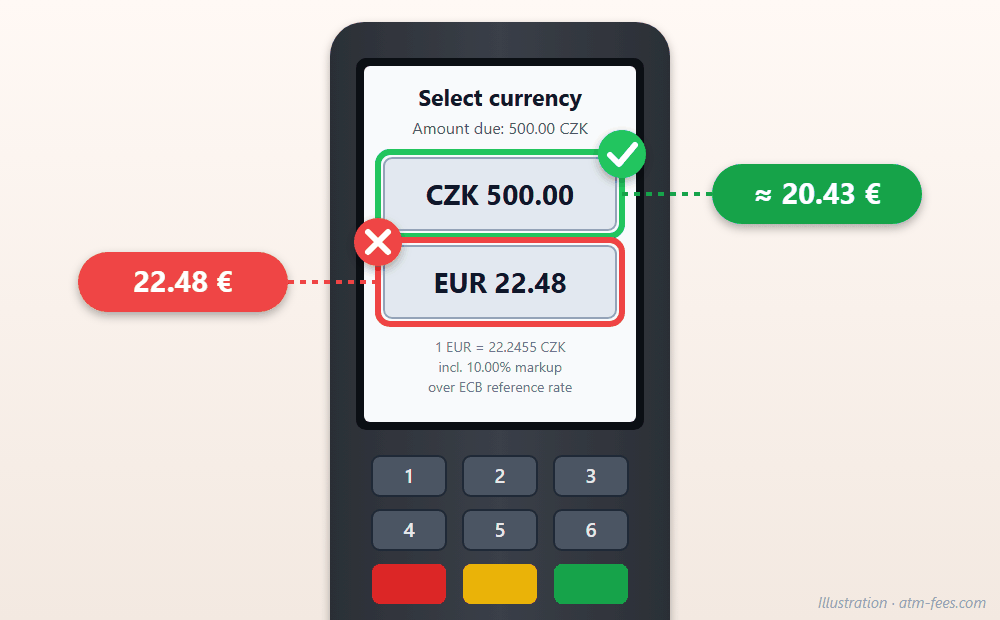
Card terminals offer the same option: two amounts, one in koruna, the other in your home currency. Always choose the local currency, here the koruna. If the waiter makes the choice for you and hands you a terminal already set to euros, ask them to cancel and run it again in koruna. Check the receipt too: if it shows an "exchange rate" and a total in your currency, DCC was applied.
Wording to recognize
The wording changes from one machine to another, but the principle stays the same: one option offers your own currency, the other the local currency.
| Avoid (DCC) | Choose |
|---|---|
| With conversion | Without conversion |
| Accept / Accept conversion | Decline / Decline conversion |
| Pay in EUR (USD, GBP…) / Charge me in my currency | Pay in CZK |
| Your home currency | Local currency |
| Guaranteed rate | — |
Watch the layout: on some screens, the decline option looks like plain text rather than a button, to draw your eye to the paid option. Take a few seconds to read the whole screen before pressing anything.
Prague: a case that went all the way to Brussels
In central Prague, Euronet runs the vast majority of ATMs: 79% in the Prague 1 district and 77% in Prague 2, according to Czech news site Seznam Zprávy. In June 2026, it reported the case of a tourist withdrawing €1,000: the screen showed a total of €1,003.95, and her account was charged €1,175: €171 more than displayed. Czech MEP Markéta Gregorová referred the matter to the European Commission. A week later, Euronet framed the cancel option on its Czech screens to make it more visible; the company says the change was already planned. The display is still hard to decode for a traveler in a hurry, which is why it pays to know what to look for.
Pressed the wrong button?
- Before confirming: press "Cancel". You can start again and choose the local currency. At a card terminal, ask for a new transaction.
- Afterwards: the conversion is usually final, since you accepted it on screen. But if the amount charged doesn't match the one displayed, contact your bank with the receipt: that kind of discrepancy can be disputed.
- If you weren't given the choice: Visa and Mastercard rules require DCC to be offered to you and accepted by you. If the waiter or the terminal applied it without asking, you can dispute it with your bank.
- Next time: favor ATMs belonging to local banks over those of independent operators set up in tourist streets.
The right habit, in one sentence
When you see two amounts, always choose the one in the local currency: "Without conversion", "Decline", "CZK".
Declining DCC sorts out the exchange rate, not the withdrawal fees. To find out which ATMs are free locally, see our pages on the Czech Republic and Hungary, where these screens are very common, and Austria, where independent ATMs mainly charge withdrawal fees. And for all the habits to adopt before you leave: how to withdraw money abroad without fees.
Comments
No comments yet. Be the first!
Leave a comment